
🔵 How Embedded Studio works
Embedded Studio is a software application for use throughout the entire software development cycle. It guides and simplifies the development process with features like syntax highlighting, code completion, and real-time error checking. With Embedded Studio's integrated and advanced debugging features, users can easily identify and fix bugs by setting breakpoints, stepping through code, inspecting variables, and evaluating expressions.


Package Manager
Embedded Studio simplifies software management by enabling users to seamlessly download, update, and integrate libraries, tools, and board-support packages
directly into their respective
projects.

Project Manager
Embedded Studio allows
streamlining of project organization and development via management of files, build configurations, and dependencies.

Code Editor
The code editor enhances
development efficiency with
features like syntax lighlighting, intelligent code completion, and integrated diagnostics for seamless
coding.

Code Analyzers
Embedded Studio includes tools that allow memory analysis, static stack analysis, static code analysis, and trace and profile execution.
Runtime Library
Embedded Studio includes the
complete emRun C runtime library as well as the emRun++ C++ standard library, both of which are specifically designed and optimized for embedded applications..
Graphical Debugger
Embedded Studio provides an
intuitive interface for debugging, with advanced visualization of application behavior, real-time insights, and seamless integration with J-Link.
RTOS Awareness
TThe RTOS awareness plug-in for Embedded Studio enables the visualization of task activity and stack use during debugging sessions.
Simulator
Embedded Studio contains a full instruction-set simulator (emSim) for supported architectures. It is ideal for familiarizing oneself with new architectures, writing and
testing application programs with no hardware present, and utilizing automated testing.
SEGGER Toolchain
A toolchain is crucial in software development, especially for embedded systems. The compiler translates source code into machine code, the linker combines different code modules into a single executable, and the C++ library provides all features that make object-oriented programming (OOP) fast and easy. Together, they simplify the development process, ensuring efficient, optimized code. The SEGGER Toolchain reduces errors, simplifies debugging, and enhances performance, making it a key asset for building reliable, high-quality applications in resource-constrained environments.

SEGGER Compiler
Generate optimized C/C++ code for embedded systems
The SEGGER Compiler is a Clang-based C/C++ compiler for Arm microcontrollers that supports the latest C/C++ language features. It generates fast, compact
Thumb-2 code optimized for Cortex-M and
Cortex-A processors.
SEGGER Linker
Simplified linking and optimized application size
The SEGGER Linker speeds up linking, optimizes application size, simplifies memory layout configuration, and addresses common linking issues in Arm- and RISC-V-based embedded systems.

SEGGER C++ Library
Optimized C++ library for
modern embedded systems
The SEGGER C++ Library is a complete standard library tailored for embedded systems. As C++ grows in importance for embedded applications, the library is
continually updated to meet modern C++ standards.
Licensing
The software is available under various embedded software license models and can be delivered as source code. All commercial licenses are based on a one-time payment, are royalty-free, and include six months of updates and support from SEGGER's Embedded Experts. There are no subscription fees, ensuring predictable and fixed costs over the entire product lifetime.
For non-commercial use, evaluation, and educational purposes, the software is provided under SEGGER's Friendly License.
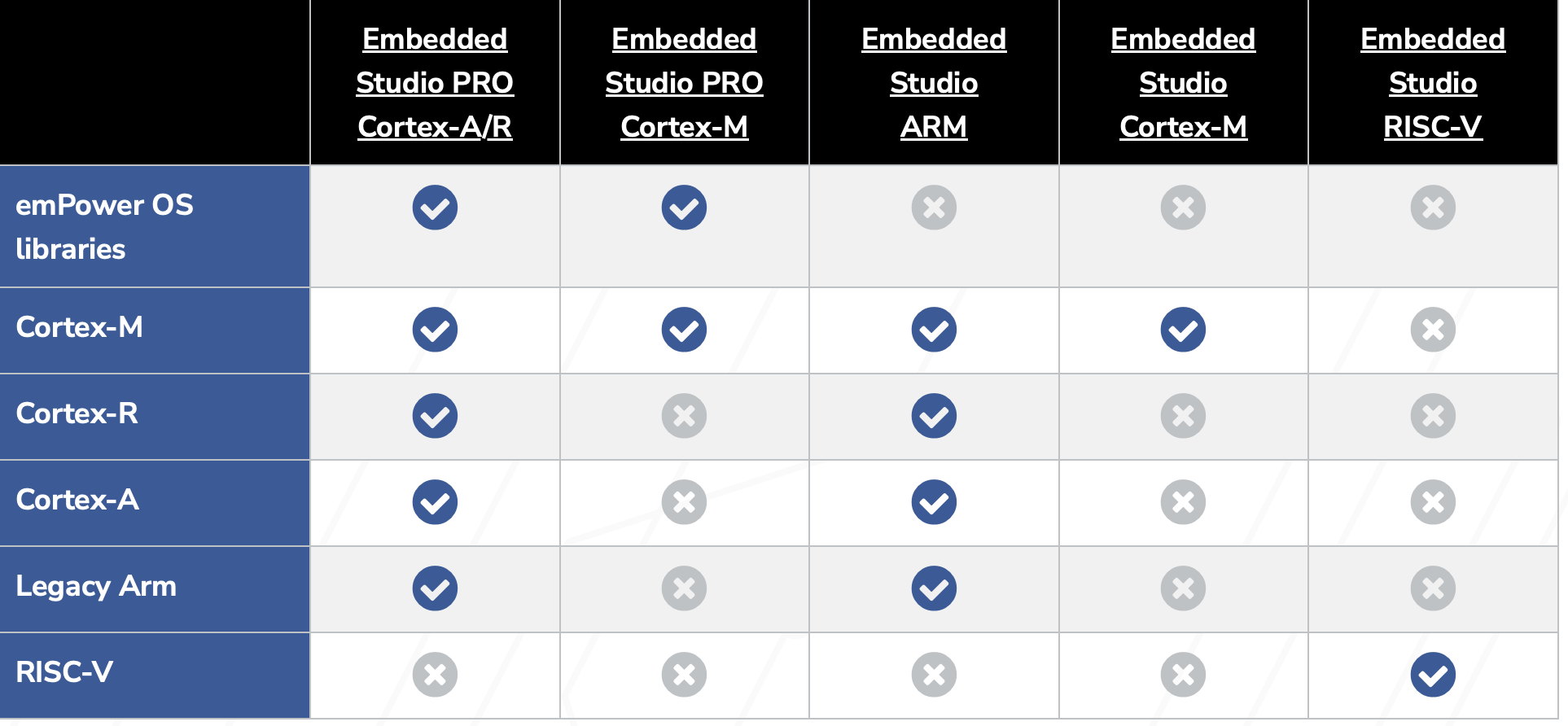
Choose your Embedded Studio
Services & Support
Evaluation Software
NEWSLETTER & Training
Update: October 3rd, 2026
© 2026 Carnica Technology. All Rights Reserved. Contact Us · Legal & Privacy